
How To Exclude Funds from Impact (Impact - Exclude Funds Import)
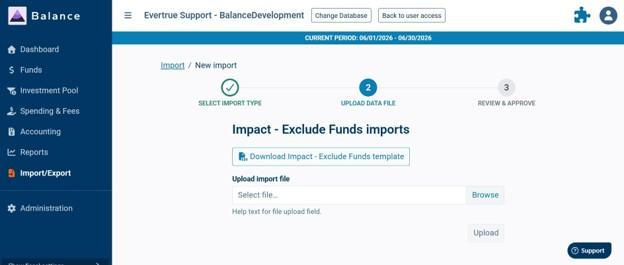
The Impact - Exclude Funds import lets you stop specific funds from flowing into Impact through the nightly sync. such as funds that shouldn't be donor-facing. Today, all funds connected to your Balance database sync into Impact automatically; this import gives you a self-service way to hold specific funds back from that sync.
If you're interested in using this import, please reach out to support.balance@evertrue.com to have it enabled in your Balance database.
Using the Import
Navigate to Import/Export on the left panel in Balance and click the 'Create new import' button.
Select the Impact - Exclude Funds import from the dropdown menu and click Continue.
Download the import template.
Populate the import template with the GLID of the fund(s) you want to exclude from Impact. Include every fund that should currently be excluded, not just new ones as this import will overwrite any previously imported files.
Once you've completed your template, save locally and use the Browse button to select the file to be uploaded. Once the file has been selected, click on Upload to bring that file into Balance.
You'll then see a table with the selected funds and you'll click the 'Approve import' button to process the file.
Please Note: This import file needs to be the full list of excluded funds each time you use it. It does not add to a prior list, it replaces it entirely.
To add more exclusions: take your last uploaded file, add the new Fund ID(s) to it, and upload the combined list.
To re-include a fund: remove its Fund ID from your last uploaded file and upload the updated list.
Frequently Asked Questions
How do I get access to this import type?
Submit a support ticket requesting that the Impact - Exclude Funds import be enabled for your database. Once it's turned on, it will appear as an available import type in Balance going forward-you won't need a ticket for every update.
Do I run this import in Balance or in Impact?
In Balance. This import controls which funds are sent to Impact. The import must be turned on within Balance for it to be available within the Import/Export menu, alongside all other Balance import types.
If I exclude a fund, does it remove historical data already in Impact?
Yes. Excluding funds affects future nightly syncs to Impact. By excluding a fund, all fund information will be removed from impact going forward. If there was an impact report previously generated with the Fund Financial or any other fund level page then this report will still remain.
What happens if I forget to include a fund that was previously excluded?
It will be set back to included (synced to Impact) the next time this import runs, since each upload is the full, authoritative exclusion list. Always double-check your file includes every fund you currently want excluded before uploading.
Can I exclude or re-include one fund at a time?
Not directly-there's no individual on/off toggle for this feature. Each update is done by uploading your full, current exclusion list, so adding or removing a single fund means updating that list and re-uploading it.
How do I clear this list so that no funds are excluded?
Balance will not accept and empty file for this import. If you need to include all funds, please reach out to support.balance@evertrue.com for assistance.
Reply
Content aside
- 12 days agoLast active
- 11Views
-
1
Following