
Release Notes: November 7, 2026
Release Date: November 7, 2026
NEW Fund Market Value Detail Export
This new export allows users to export the period-by-period market values behind a fund’s spending average.
What’s included:
Your choice of cadence: Monthly, Quarterly or Annually. Quarterly is the default, and EverTrue Support can change it for you.
Up to 20 periods by default, using Fund Pooled Market Value.
Optional GL Date: enter a start date to limit how far back the export goes, for example if you only need the last 12 quarters.
Simple layout: Fund ID, Fund Name, then one column of market value per period.
To have this export turned on in your database, please contact support.balance@evertrue.com.
NEW Fund Note Changes Report
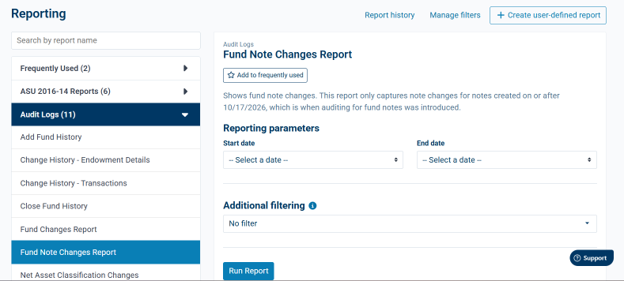
The new Fund Note Changes Report gives your team a history of changes made to fund notes, so you can see when a note or its category was changed. This report is in the Audit Logs folder on the Reporting page.
What’s included:
A searchable data grid of fund notes changes.
A Note ID to help with the Fund Notes import to make updates to an existing fund note category and/or value.
NEW Impact - Exclude Funds Import
Customers who use Balance and Impact together can now decide which funds should stop flowing into Impact. Previously, every fund was sent over automatically and keeping one out required help from Support. See this article for more information and instructions: How To Exclude Funds from Impact (Impact - Exclude Funds Import)
Updated New User Welcome Email for SSO Databases
When you add a new user at an institution that signs in through single sign-on (SSO), their welcome email previously showed outdated branding, contact details and resources. It now uses the current EverTrue subject, branding and support information.
Fund Reporting users receive their own version of the welcome email.
Institutions that do not use SSO are unchanged.
Bugs/Defects
Report Filters Now Accept Values with More Special Characters
What was happening: When you added a filter value that contained parentheses, such as Instruction (Class Fund), you received the error “Expression should be a valid Varchar.” This affected filters on user-defined reports, managed filters, and the filter values you can change when running a report.
What was fixed: Filter values with parentheses are now accepted on all screens where you can add or edit them.
Also Improved:
In addition to - _ . , ! ? the characters ( ) & ' / # are now accepted in filter values.
Whole number and decimal fields accept negative numbers.
“Is Between” compares values as numbers rather than text, so a range such as 2 to 10 now works. Decimal fields are checked too.
The following characters are are not accepted in filter values: ; < > @ * %
Reply
Content aside
- 57 min agoLast active
- 2Views
-
1
Following