
Release Notes: May 19, 2026
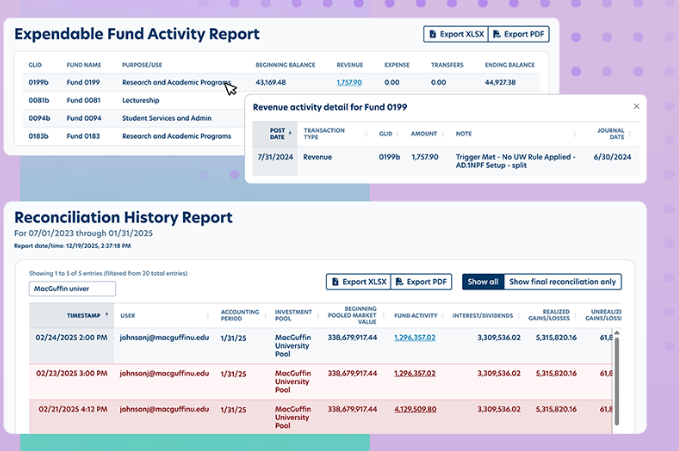
This release focuses on giving you greater visibility into fund performance, introducing flexible new spending rules, and debuting our next-generation interactive reporting experience.
New Features & Enhancements
Fund Activity View Updates
The Fund Activity view within the Fund Reporting Role has been updated to include two key financial summary figures along with current value date information in the side panel:
Investment Performance: Now displayed for Endowment funds, offering fund stewards an at-a-glance view of how investment activity contributed to fund growth during the selected period.
Change in Balance: Now displayed for both Endowment and Expendable funds, showing the net difference between the Beginning and Ending Balance for the period.
Additional Fund Detail Improvements
'As Of' Dates: The Fund Detail View now displays an "as of" date alongside Market Value, Historical Gift, and Expendable Fund Balances.
Fixed Printing: Printing a Fund Detail page now includes the full display of the Purpose Description, resolving a previous issue where the text was truncated.
Default Sorting: To help you orient to the latest activity quickly, the transaction detail table now defaults to sorting by Post Date (most recent first) on page load.
New Spending Rule Types: Dollar Per Unit
To give institutions greater flexibility in calculating endowment spending distributions, we have expanded our Balance Spending Rule Types to include two new options:
Dollar Per Unit – Mid-Year Adjusted (DPU2)
This rule applies a dollar-per-unit rate to a fund's pool units at the allocation date, but adds back any distribution units posted since the last fiscal year end before calculating the spending amount.
Why it matters: This ensures mid-year payouts do not inadvertently erode or reduce the unit count used for subsequent spending calculations. It is ideal for institutions managing multiple distributions within a single fiscal year.
How it works: Balance looks at the total investment pool units at the allocation date, adds back distribution units posted since the last fiscal year end, and multiplies that adjusted unit count by your dollar-per-unit rate.
Dollar Amount Per Unit – 12-Month Average (DPU4)
This rule calculates the spending distribution by multiplying a fixed dollar-per-unit rate by the fund's average investment pool units over the trailing 12-month period leading up to and including the allocation date.
Why it matters: Rather than using a single point-in-time unit count, this smoothed approach provides a stable, averaged unit base—perfect for funds that experience significant unit fluctuations throughout the year.
How it works: Balance sums all posted month-end unit values for the fund over the trailing 12 months, divides them by the number of periods in the fiscal year, and multiplies the resulting average by the spending rule rate.
Early Adopter Phase: Upgraded Interactive Reporting
We are thrilled to debut our new interactive reporting experience, entering the Early Adopter phase with three completely rebuilt standard reports. We have replaced the static Balance Report Viewer / SSRS views with a modern, accessible data grid that gives you complete control over how you view, analyze, and export data.
If you would like early access to these reports to provide feedback, please reach out to your EverTrue Customer Success representative!
Reconciliation History Report
Upgraded to the interactive grid experience to make reviewing and drilling into your reconciliation data seamless.
What’s New: Sortable and searchable data grid; Show All and Show Final Reconciliation Only toggles ; visual flags on rows with reconciliation differences ; and an inline Fund Activity drilldown popup to view breakdowns of distributions, expenses, transfers, and income without leaving the report. Exports to XLSX and PDF.
Expendable Fund Activity Report
Rebuilt to offer a cleaner, highly navigable view of expendable fund transactions.
What’s New: Interactive grid with sort, search, and grouping options (such as by Purpose/Use) ; currency formatting for instant readability ; and a Transaction drilldown click-through popup grid featuring its own sorting, searching, paging, and export capabilities. Exports to XLSX and PDF at both the report and drilldown levels.
Endowment Activity Rollforward Report
Dynamically tracks endowment transaction activity, replacing the legacy static output.
What’s New: Real-time search and column sorting; Dynamic grouping (e.g., by Net Asset Classification) with automatically calculated subtotals and a sticky grand total row ; instant reconciliation via automatic totals across all financial columns ; and a transaction detail drilldown. Exports as a clean, flat data file to XLSX and PDF for further analysis.
Coming Soon to Balance Reporting
We are actively building the following interactive reports, which will be officially announced upon release:
Fund Changes Report: Will provide an interactive data grid to track fund attribute changes over time, complete with search, sort, and export functions.
Market Values & Historical Gift Report: This view consolidates two legacy reports (the Market Values and Historical Gift Report and the Underwater Funds Report) into a single tool. It features a calculated Appreciation / Depreciation column, a one-click Underwater Funds toggle that filters to at-risk funds while dynamically updating grand totals, and full WCAG 2.1 AA accessibility compliance.
Additional Improvements & Bug Fixes
Secondary Spending Rules: The
Secondary Spending Rulefield has been added to the Fund Profile data source, allowing you to include secondary rule data alongside primary rules in your User-Defined Reports.Transaction Type Settings: Updated to improve Impact Units accuracy. Standard transaction types with no cash impact (multiplier = 0) and all Expendable fund activity types now correctly display "No" for Impact Units, removing misleading indicators for admins.
Standardized Book Value: Book Value processing has been standardized across all customers to consistently use Transaction Type Settings. This allows institutions to use this field to track an additional balance alongside Historical Gift and Market Value.
Modern Multi-Select Controls: Dropdown multi-select inputs across Spending and Reporting have been upgraded. Selected items now include a visible, keyboard-navigable "×" clear button, improving accessibility standards and making it easier to remove individual selections.
Welcome Email Fix: Resolved an issue where new user welcome emails were not populating for non-Fund Reporting roles. Welcome emails will now send properly for Admin, Client, Report Only, and Read Only user roles upon account setup.
Reply
Content aside
- 5 mths agoLast active
- 78Views
-
2
Following